Making Passwords Simple!

Overview

computer screen with shield and key inside

You are often told your passwords are key to protecting your accounts (which is true!), but rarely are you given a simple way to securely create and manage all your passwords. Below we cover three simple steps to simplify your passwords, lock down your accounts, and protect your future.

Passphrases

The days of crazy, complex passwords are over. Those passwords are hard to remember, difficult to type, and with today’s super-fast computers can be easy for a cyber attacker to crack. The key to passwords is to make them long; the more characters you have the better. These are called passphrases: a type of strong password that uses a short sentence or random words. Here are two examples:

  • Time for strong coffee!
  • lost-snail-crawl-beach

Both of these are strong, with over twenty characters, easy to remember, and simple to type but difficult to crack. You will run into websites or situations requiring you to add symbols, numbers, or uppercase letters to your password, which is fine. Remember though, it’s length that is most important.

Password Managers

You need a unique password for every account. If you reuse the same password for multiple accounts, you are putting yourself in great danger. All a cyber attacker needs to do is hack a website you use, steal all the passwords including yours, then use your password to log in to all your other accounts as you. It happens far more often than you realize. Don’t believe it? Check out the website www.haveibeenpwned.com to see what sites you use that have been hacked and your passwords potentially compromised. So what should you do? Use a password manager.

These are special computer programs that securely store all your passwords in an encrypted vault. You only need to remember one password: the one for your password manager. The password manager then automatically retrieves your passwords whenever you need them and logs you in to websites for you. They also have other features such as storing your answers to secret questions, warning you when you reuse passwords, a password generator that ensures you use strong passwords, and many other features. Most password managers also securely sync across almost any computer or device, so regardless of what system you are using you have easy, secure access to all your passwords.

Finally, be sure to write down the password to your password manager and store that in a secure location at home. Some password managers even let you print out a password manager recovery kit. That way, if you forget the password to your password manager you have a backup. Or, if you get sick or find yourself in an emergency, your spouse or trusted family member can retrieve the information on your behalf.

Two-Step Verification

Two-step verification (often called two-factor authentication or multi-factor authentication) adds an additional layer of security. It requires you to have two things when you log in to your accounts: your password and a numerical code which is generated by your smartphone or sent to your phone. This process ensures that even if a cyber attacker gets your password, they still can’t get into your accounts. Two-step verification is simple to set up and you usually only need to use it once when you log in from a new computer or device. Enable this whenever possible, especially for your most important accounts such as your bank or retirement accounts, or access to your email. If you are using a password manager, we highly recommend you protect it with a strong passphrase AND two-step verification.

It may sound silly, but these three simple steps go a long way in protecting your job, your reputation, and your financial future.

Subscribe to OUCH! and receive the latest security tips in your email every month.


Resources

Have I Been Pwned:  https://haveibeenpwned.com/
Two-factor Authentication Site:  https://twofactorauth.org/
Long Live the Passphrase:  http://www.sans.org/u/OKJ
Time for Password Expiration to Die:  http://www.sans.org/u/OKO
NIST SP800-63B Digital Identity Guidelines:  https://pages.nist.gov/800-63-3/sp800-63b.html

OUCH! is published by SANS Security Awareness and is distributed under the Creative Commons BY-NC-ND 4.0 license. You are free to share or distribute this newsletter as long as you do not sell or modify it. Editorial Board: Walt Scrivens, Phil Hoffman, Alan Waggoner, Cheryl Conley

Help Us Create the Fall Academy Schedule!

cover of Fall Academy scheduleFall Academy 2019 will take place from Monday, August 19th to Friday, August 30th.

If you would like to offer a session, please let us know the following information:

  • Title
  • Description
  • Presenter(s)
  • Duration
  • Format (panel session, information session, guest speaker, workshop, etc.)
  • If you would like a breakfast or luncheon session (or to offer coffee and cookies/pastries), please let us know if you have funding.
  • Preferred days, times — we’ll try to accommodate, but some mandatory sessions and sessions that are already booked might prevent this — and locations.

Questions? Contact Julie Knudson (jmknudson@wlu.edu, 540.458.8125) or Helen MacDermott (hmacdermott@wlu.edu,540.458.4561). Thank you!

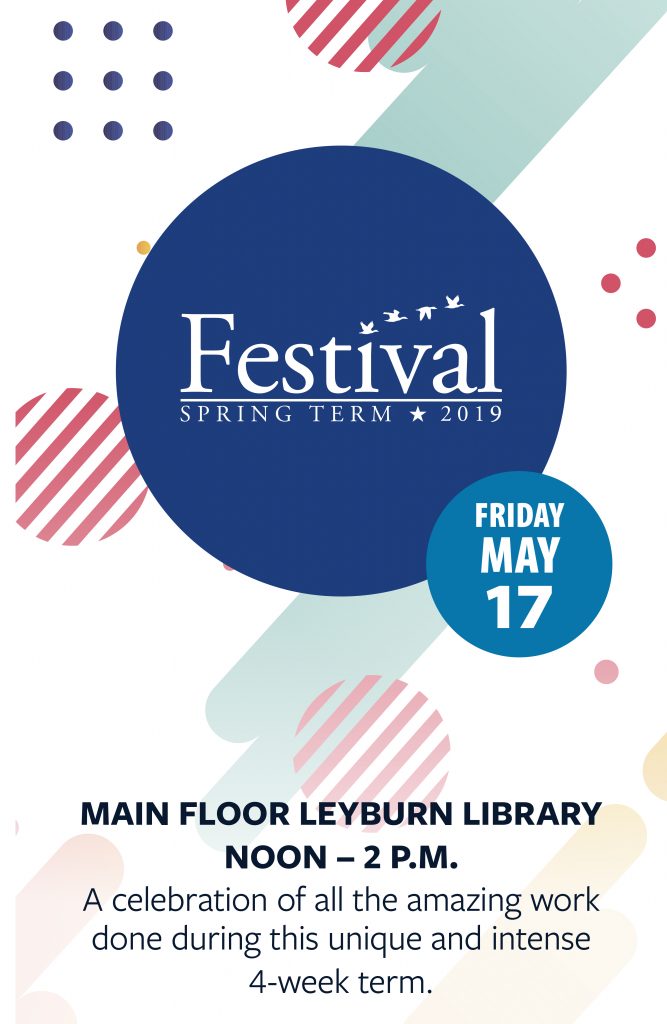
Sign up for the Spring Term Festival!

Sign up for the Spring Term Festival!
Four weeks. One class. Your undivided attention. In the lab, in the field, on the road, around the world. Come and celebrate with us!

The festival is free and all are invited. Refreshments will be provided.

We’re excited that you want to celebrate the work of your students who have been exploring the depth and breadth of a single course for an intense four weeks! Please sign up for the Spring Term Festival  to tell us what you’ll need to be able to showcase your students’ work. The more information you can provide, the better.

We will do our very best to honor all requests. Please keep in mind that we will honor requests in the order in which they are submitted. Thank you!

IMPORTANT NOTE TO ALL WORDPRESS USERS!

To support W&L’s commitment to diversity and inclusion, ITS is committed to ensuring that web and online content is accessible to all. As such, we are in the process of making WordPress sites more web accessible for individuals with disabilities.

As part of that process, we would like your assistance with educational course sites created in WordPress, in particular, course sites that are public-facing.

No action is necessary during the term, but after the end of the current term, we will request your permission to change the visibility settings on created course sites from public to private.  This will allow you and your enrolled students access to the site after the term, but will restrict access beyond your class.

If you would prefer your site to remain public, then it will be your responsibility to ensure the site meets the web accessibility guidelines mandated by the University for public-facing websites (guidelines and site evaluation tools available at https://www.wlu.edu/disability-accommodations/web-accessibility).

We have worked to ensure that all themes and settings are accessibility-ready in our WordPress service, and we will be happy to work with you at that point to ensure your added content meets these guidelines as well.

Happy Holidays! Have a Great Winter Break!

Whew! We did it! We made it! What a great fall! We wish everyone a safe and happy, relaxing, restful winter break, and we look forward to seeing you in January 2019!

Have a great winter break!


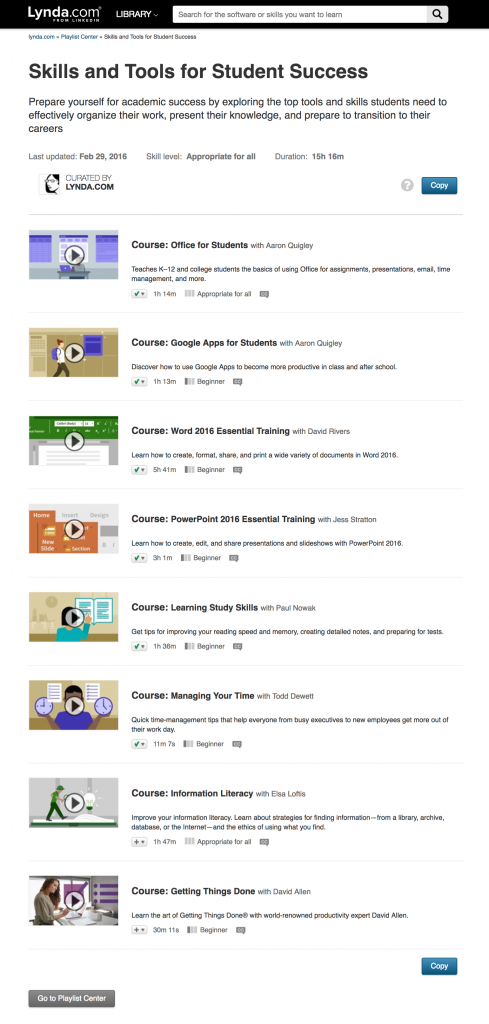
(For any of you overachievers, here’s a great, curated Lynda.com playlist created especially for students: Skills and Tools for Student Success.

Screen capture of Lynda.com playlist, Skills and Tools for Student Success

If you want to prepare yourself for academic success by exploring the top tools and skills students need to effectively organize their work, present their knowledge, and prepare to transition to their careers, then this playlist is for you. Annnnnnnndddddd if you need to focus on getting some R&R, we totally understand!)

Monday Productivity Pointers from Lynda.com

Happy Monday!

In this weekly series on being productive with technology, Lynda.com authors Jess Stratton, Garrick Chow, and Nick Brazzi introduce tools and tips to help make today’s software and devices work more efficiently and powerfully for you. With everything from pointers on using Microsoft Office and Google platforms to learning social networking skills and discovering the most useful apps for your iPhone or Android device, there’s something for everyone.

This week’s pointers:
Safely clearing drive space in macOS

https://www.lynda.com/iOS-tutorials/Safely-clearing-drive-space-macOS/114903/799084-4.html

The Center for Academic Resources and Pedagogical Excellence (CARPE)

The Center for Academic Resources and Pedagogical Excellence (CARPE) will be a state-of-the-art Teaching and Learning Center. It will have two primary functions: CARPE will support faculty development towards becoming ever better teachers, through workshops, experimental classrooms, presentations, practice space, and uses of new technology and techniques in teaching; and CARPE will support student learning, through tutoring expertise, a writing and communication center, executive function support, group and individual learning sessions, and uses of new technologies for learning.

Members of the CARPE Task Force discuss the impact that CARPE will have on the campus, including benefits for faculty and students and changes to Leyburn Library. Watch below!

Academic Technology in the News

How Faculty Can ‘Click’ Their Way to a More Inclusive Classroom

What do you think is important for an instructor to do when using classroom response systems (polling software or clickers)? Select all that apply.

A) Choose questions that most students will be able to answer correctly.
B) Vary the types of poll questions beyond multiple choice.
C) Ask students “Please discuss your answer with a neighbor.”
D) Stress that students answer questions independent of their peers.

Note: Kelly Hogan and Viji Sathy will be presenting at Winter Academy! Sign up for “Leveraging Technology to Cultivate an Inclusive Classroom” on Monday, December 10th at 9:15 am in Hillel 101 at go.wlu.edu/winteracademy.

Enhancing Learning through Zest, Grit, and Sweat

Early in my career, I focused most of my efforts on teaching content. That is, after all, what most of us are hired to do, right? With experience and greater understanding of how learning works, my attention shifted toward metacognition. I began investing lots of time and energy reading and identifying ways to help students grow as learners while they learned the content.

What Professors Can Learn About Teaching From Their Students

Marcos E. García-Ojeda wants to improve his teaching. He has flipped his classroom and embraced active-learning techniques. And he’s even invited some observers to sit in on his “General Microbiology” class here at the University of California at Merced on a recent afternoon.

The observers will give Mr. García-Ojeda, an associate teaching professor of biology, a detailed depiction of the teaching and learning in his class — actions that are central to a college’s purpose but rarely examined.

This examination is especially unusual because of who’s performing it: undergraduates.

Teaching Critical Thinking: Some Practical Points

We all endorse it and we all want our students to do it. We also claim to teach it. “It” is critical thinking, and very few of us actually teach it or even understand what it is (Paul & Elder, 2013).

What’s the blueprint for a 21st-century college campus?

With enrollments declining and technology advancing, colleges are breaking ground on spaces that give students and faculty new ways to engage.