Why Audio Transcription Matters

pink, purple, and blue soundwave forms

Audio transcription is the process of converting audio (or video) content into written text

Between brainstorming and planning, writing and recording, editing and mixing, you’ve put in a significant amount of time and effort to create a podcast. Why would anyone want to pile on the additional work of generating a word-by-word account of that incredible episode?!?

Consider this: you’ve already put in a significant amount of time and effort — not to mention blood, sweat, and tears — to create a totally amazing podcast, right? Now, all you need are listeners! Don’t you want your podcast to be as accessible and discoverable as possible?

According to the National Institute on Deafness and Other Communication Disorders, 37.5 million American adults aged 18 and over report some trouble hearing. 30 million Americans aged 12 years or older has hearing loss in both ears, based on standard hearing examinations. 

Not only does audio transcription make it possible for a user who is hard of hearing to engage with your content, it can also clear up confusion caused by regional dialects or unavoidable background noise wherever a listener may be.

Having a text transcript available on your website also invites search engines like Google to crawl, and index your content, making your podcast findable to your dream audience! Who wouldn’t want more search traffic and visitors?

An audio transcript creates a better experience overall for all users. New and existing listeners can give a transcript a quick look  before committing to listening to the full podcast. It’ll also be easier for your audience to search text to find some fascinating/interesting/thought-provoking tidbit rather than try to located the snippet in the audio itself.

If we’ve sold you on the value of audio transcription, listen up, because there’s a quick and painless way to create a transcript!

Did you know the online version of Word can transcribe audio that you record directly within Word? Better yet, if you already have a .wav, .mp4, or .mp3 file, you can simply upload it to Word and have it transcribed for you? Microsoft’s AI will even identify different speakers and organize the conversation into sections that you can easily edit and ultimately insert into a Word document. Pretty nifty, right?

Check out the official Microsoft Help Guide: Transcribe your recordings.  We’ve tested it and can verify that it works great!

Happy Transcribing!

NOTE: You are limited to five hours per month for uploaded audio; there is no transcription limit for audio recorded within Word on the web. English is the only language that is currently supported. You MUST use either the latest version of Microsoft Edge or Google Chrome.

Have questions? Need help? Email the ITS Information Desk at help@wlu.edu, call 540-458-4357 (HELP), or stop by the ITS Information Desk on the Main Level of Leyburn Library.
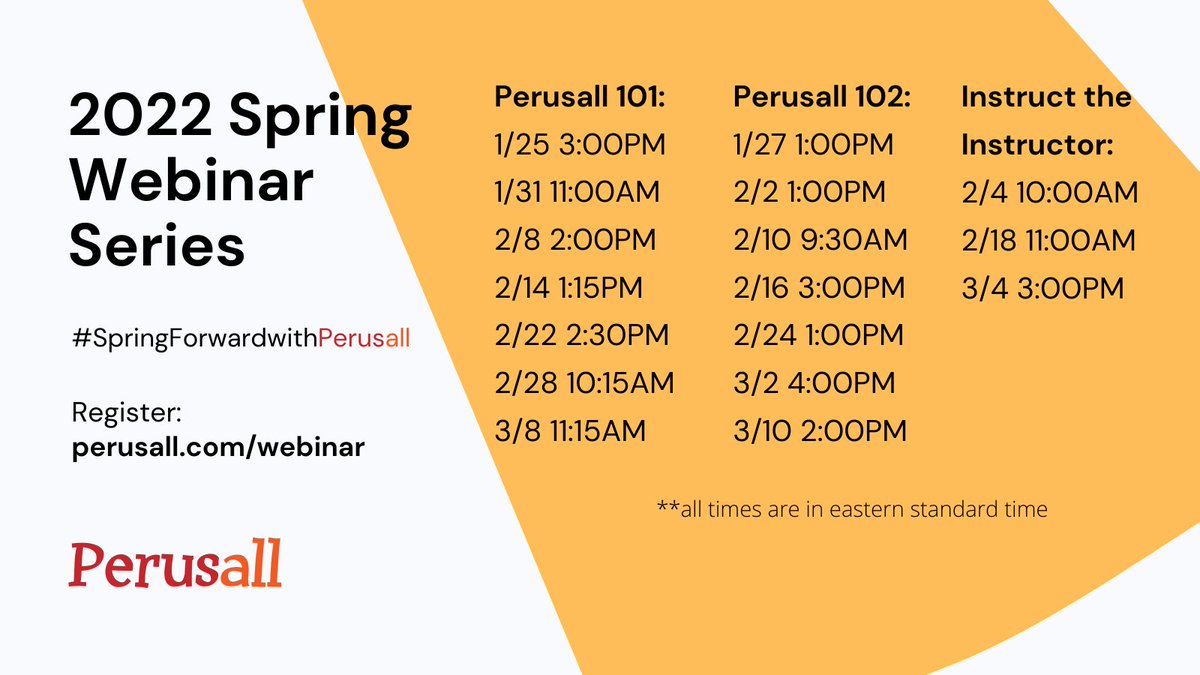
Spring Forward with Perusall

Have you heard about Perusall, the social reading platform that allows students to collectively read, annotate, and discuss the readings, but not sure how to implement it in your class? Have no fear!

Perusall is offering free webinars to help get you started or up-leveling the Perusall skills you already have.

Perusall 101

Perusall 101 will cover how to get up and running with Perusall’s product features such as grouping, building out your Library, and setting up assignments. There will also be an opportunity to ask questions. This webinar is designed for those brand new to Perusall or are looking for a refresher on Perusall fundamentals.

Perusall 102

Perusall 102 is the up-level course from the Perusall 101. We will take an in-depth review of some of Perusall’s technical features, including multimodal assignments, Peer Review assignment creation, auto-grading, grouping, and LMS set up. There will also be an opportunity to ask questions.

2022 Spring Webinar Series: Register at perusall.com/webinar.

Need help with or have questions about Perusall? We’ve got you covered! Contact the ITS Information Desk at 540.458.4357 (HELP), email help@wlu.edu, or stop by the ITS Information Desk on the Main Level of Leyburn Library!

Who Needs a Box Tutorial?

New to using Box, W&L’s cloud storage solution? Never had the time to learn about Box?

Learn how to set up your workspace for success, collaborate securely, find and share files quickly, and edit with ease by watching the videos below!

“Box Basics: Explore The Essentials” Playlist

Getting Started With Box (4:25)

Get a quick orientation to Box and its most used features.

Find Your Files Fast (3:26)

Learn how to quickly find your content in Box using Collections, Favorites, the Search bar, Recents, and metadata.

Set Up Your Workspace for Success (3:51)

Explore tips and tricks on how to set up your workspace and collaborate with others efficiently.

Share Quickly and Easily (4:00)

Learn about how Shared Links can help you give quick, one-off access to your content in a secure way.

Collaborate Securely (5:01)

Learn about giving more in-depth content access to collaborators, including waterfall permissions, inviting to files vs folders, and adjusting permissions.

Create and Edit with Ease (2:50)

Learn about Box editing features including creating and uploading files and folders, version history and using Microsoft and Google capabilities.

Have questions? Need help with Box? Contact the ITS Information Desk at 540.458.4357 (HELP), stop by the Main Level of Leyburn Library to chat, or email help@wlu.edu. 


Print Your Own Copy of the Winter Academy Schedule

As always, you can always find the latest and greatest Winter Academy schedule online at go.wlu.edu/winteracademy, but in case you’d like a print copy, have at it!

The Art of Waterjet Cutting

The IQ Center recently collaborated with Studio Art professor Sandy de Lissovoy on a sculpture project for his ARTS 232, Intermediate Sculpture, class.

Students in the class are learning metal sculpture techniques and the new waterjet cutter in the IQ Center provides interesting options for creating metal work. The waterjet cutter uses a computer controlled, high pressure stream of water mixed with abrasive powder to cut almost any material, including steel.

In this “Digital Shapes and Metal Work Sculpture” assignment, students were instructed to create a portion of their sculpture using the waterjet cutter. This portion of the project gave them the opportunity to learn Adobe Illustrator, which is used to create the intricate vector shapes to be cut.

The IQ Center provided training and troubleshooting for the students during the project making it easy to incorporate this element into a larger project.


Want to incorporate technology like this into your Winter term course? Contact Dave Pfaff at 540.458.8044 or just stop by the IQ Center!

Registration for Winter Academy is Now Open!

cute deer against snowy background. Winter Academy, Dec 13-16, 2021. go.wlu.edu/winteracademy

W&L is committed to supporting faculty members with all levels of experience in reaching their full potential as educators, scholars, and mentors.

Winter Academy offers learning opportunities for all staff and faculty to enhance their teaching, scholarship, and service in a collaborative and thought-provoking environment.

Whether you’re seeking new ways to better support students, deepen your familiarity with University resources, or take your scholarship to the next level, there’s a session for everyone. All faculty and staff are encouraged to attend.

Sign up now at go.wlu.edu/winteracademy. Please note that registration for all catered sessions will close FIVE (5) business days before the session so that we can provide an accurate headcount to Dining Services. Kindly register for sessions as soon as you know you are able to attend. Thank you!

Want to Present at Winter Academy? Let us know before November 5th!

We are accepting session proposals for Winter Academy, which will be Monday, December 13 through Thursday, December 16.

If you would like to offer a session, please complete the form below. We will do our best to honor requests in the order in which they are submitted.

Questions? Contact Julie Knudson (jmknudson@wlu.edu, x8125) or Helen MacDermott (hmacdermott@wlu.edu, x4561). Thank you!

You’re Invited!

Take it to Harte - Join us on Wednesday from 10-11 am for light refreshments

The Harte Center is hosting an informal gathering at the southern end of the Harte Center, every Wednesday from 10-11:00 a.m., through the end of Winter Term.

Feel free to stop by, grab a cup of coffee or tea and some nibbles and hang out and chat. Nothing fancy, just a chance to take a little break in the middle of the week, gather with colleagues and students, and get to know the Harte Center. 

3 Ways to Find Awe and Fight the Mid-Semester Slump

green, yellow-green, yellow, orange, red, and dark red maple leaves overlapping each other against wood background

When mid-semester hits, we often find ourselves searching for ways to calm our anxieties and refresh our energies. One potentially powerful intervention is to cultivate our experiences of awe.

University of Michigan psychologist Ethan Kross defines awe as “the wonder we feel when we encounter something powerful that we can’t easily explain.” Often the things that bring us awe have an element of vastness and complexity: Think of a starry night sky, an act of great kindness, or the beauty of something small and intricate. These moments of marvel give us more than just goosebumps; they help us tap into something larger than ourselves and, in the process, lower our heart rate under stress by silencing our mental chatter and worries. They can also increase our desire to connect with and help others.

Here are three ways to cultivate this sense of awe in your everyday life. Next time you’re feeling unmotivated or uninspired, we hope you’ll block off some time to try one.

1. Step away from your work and go on a short “awe walk”

A simple and powerful way to experience awe is to (if possible) step away from your computer or pause between classes and take an “awe walk.” Take 20 minutes to wander and be curious, observing the everyday beauty around you—even if in a familiar place such as your yard or neighborhood. Try to notice places and things you may typically rush past—a bee flitting from flower to flower, for example.

Even better, take an awe walk in a natural landscape. Research shows that walks in nature, compared to urban environments, have a greater positive effect on our mood and well-being. Nature is an immersive experience of growth and resilience; it can be a powerful source of wonder. Nature’s rhythms remind us that we are a part of the natural world, and we too are enduring.

2. Create an “awe playlist” of inspirational works

If you can’t step away, take advantage of the wonders at your fingertips on the web. Several studies have shown that videos can stimulate awe. Perhaps you’re inspired by documentaries such as Free Solo, Planet Earth, or My Octopus Teacher. Maybe Amanda Gorman’s “The Hill We Climb” makes you tingle. The harmony and complexity of music or recorded live performances can also elevate and inspire awe.

Create your own personalized “awe playlist” of videos or music, and when you’re feeling stuck, spend a few minutes being drawn into what you’re seeing and hearing. Invite moments of awe by asking the simple question, “What’s beautiful here?”

3. Seek out positive stories about the human spirit

You can also tune into news outlets that spread good news—particularly acts of kindness, generosity, and perseverance. Keep a file of stories about the goodness, benevolence, and decency of the human race. Tap into it when you are feeling overwhelmed or depleted and want to be elevated. A simple story of one person making a difference can inspire you.

We spend much of our time as educators making our voices heard. It can feel counterintuitive to engage in something that may stimulate feelings of smallness. But doing so through a positive experience of awe can, in the end, bring us that sense of grounding we’re searching for, along with energy, inspiration, and resilience.

Read the full article by David P. Fessell and Karen Reivich.

Departmental Initiatives in DE&I #2: Creating Gateways for Greater Inclusion at All Levels of Our Institution

This session brings to the table ideas about steps your departments can take to create success in our programs for both students and faculty.

Please join us on Thursday, October 7th at 12:15 pm in Hillel 101 for a conversation about ideas⁠—some fully formed, others still in a nascent stage⁠—developed in Art and Art History, Computer Science, and Chemistry.

Creating Gateways for Greater Inclusion at All Levels of Our Institution