New Zoom YuJa Connector Makes Saving and Sharing your Zoom Recordings Easier!

YuJa and Zoom company logos being added together
 

ITS has just implemented a connector linking our Zoom web conferencing tool with our video capture and media management system, YuJa. Moving forward, all recordings made in Zoom will automatically import into your personal media space within YuJa for storage and sharing.

What does this mean for you? First off, you are no longer limited by the 30-day retention policy for recordings within Zoom. You can feel confident that any recordings made during Zoom meetings will automatically and seamlessly transfer to YuJa for permanent storage and retrieval. In addition, you can take advantage of many features within YuJa to autocaption, edit, clip, and share recordings with individual students, classes, external colleagues, or to the public. If you use the Zoom tool within Canvas to schedule your class Zoom sessions, resulting recordings will even automatically publish to your course channel, making them immediately accessible to your students from within Canvas. 

You can access your imported recordings by navigating to YuJa from your MyApps page or by clicking the YuJa link in any of your Canvas courses. Once in YuJa, look for a folder in your personal media area titled “Zoom Recordings”.

Questions? Want to know more? Contact Brandon Bucy or drop by my office in the Harte Center (Room 117, Lower Level 1 in Leyburn Library).

Last Chance to Learn: LinkedIn Learning Access Ends on August 31

Due to significant price increases and low usage rates on campus, Washington and Lee’s subscription to LinkedIn Learning will end on August 31, 2024. After this date, access to course content and user learning history will no longer be available.

If you’d like to finish any incomplete courses or access any other content on LinkedIn Learning, you have until August 31 to do so.

To download your learning history, log into LinkedIn Learning though myapps.wlu.edu and navigate to the “My Learning” tab at the top of your account. Click on “Learning History,” then use the “More” button beside each course to download your certificates.

Questions? Contact the ITS Information Desk at help@wlu.edu or extension 4357 (HELP).

Need Help to Craft an AI Policy for your Syllabus?

Keep Calm and Read The Syllabus

Dr. Chris Heard, Director of the Center for Teaching Excellence at Seaver College at Pepperdine University, created a terrific tool to help instructors construct a statement about the use of generative AI for their syllabus.

This web-based decision tree tool, built using Twine, provides a customizable and interactive way for educators to draft statements that reflect their specific attitudes and policies regarding the use of generative AI in their courses. This resource ensures that faculty can clearly communicate their expectations and policies on AI usage to students, by working from a place of trust,  fostering transparency, and encouraging dialogue in the classroom.

Inspired by Heard’s work, this decision tree tool was recreated and tailored to W&L’s institutional needs. The Provost’s Office strongly recommends including an AI policy statement in every syllabus.

screenshot of the Generative AI Syllabus Statement Tool homepage

Access the Generative AI Syllabus Statement Tool

Should you have any questions or issues about using the tool, please stop by the Harte Center (LL1 in Leyburn Library). 

🔥 🔥🔥 Sizzling Summer Workshop Alert! Free Your Summer with AI (and Dr. JT Torres) 🔥 🔥🔥

JT Torres directs the Houston H. Harte Center for Teaching and Learning. He supports teachers and students in all contexts, both in and out of the classroom. His approach to educational development focuses on meaningful relationships with students, teachers, and content. He helps educators cultivate critical connections with students, building on shared interest to achieve important outcomes.

Snacks will be provided. Space is limited, so sign up now

Help Needed for JOUR 153!

"Volunteers needed" against colorful speech bubbles on a white brick wall

This spring’s Photojournalism course seeks members of the W&L and Lexington communities to be part of student photo-essays.

Students will talk with and photograph a few different aspects of a community member’s life. Community members determine what aspects they’d like to share and their availability, which may include up to a few hours spread across the term. Students will present photo-essays in a gallery setting at the end of the term. 

If interested, please contact Jared Macary, Professor of Strategic Communication, at jmacary@wlu.edu or 540-458-8240.

Sign Up for the Spring Term Showcase!


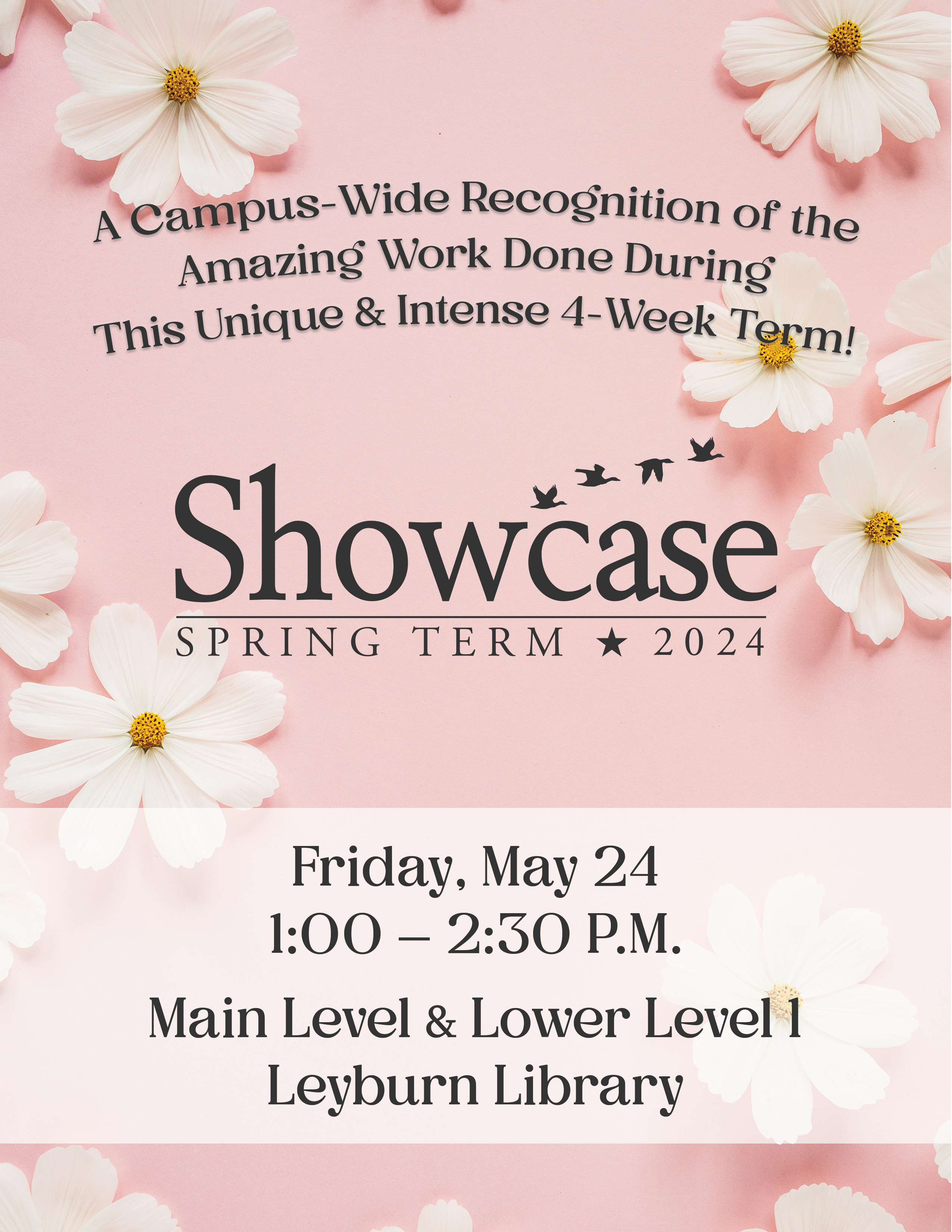
White flowers on pink background. At the top, "A campus-wide recognition of the amazing work done during this intense and unique 4-week term" Spring Term Showcase 2024. Friday May 24, 1-2:30 pm, Main Level and Lower Level 1, Leyburn Library.

The Spring Term Showcase (formerly Spring Term Festival) will take place on Friday, May 24 from 1:00 to 2:30 PM (the last day of Spring Term) in Leyburn Library. 

This is a wonderful opportunity for students to share their work/learning/growth with the W&L community.

Please note these changes:

  1. You can choose your desired location among pre-designated areas on the Main Level and Lower Level 1/Harte Center for poster easels and laptop, projector and projector screens. There are also several classrooms, as well as some open spaces and areas with tables. The location you choose will be yours for the duration of the 90 minutes. To choose your spot, please visit go.wlu.edu/springtermshowcase.
  2. Deadline to have posters printed by the University Library is 6:00 PM EST on Sunday, May 19***. Posters must be sized at 30×42 inches and submitted as a .PDF with the student’s first and last name as the file name (e.g. georgia-washington.pdf). There is no charge for printing. Upload poster files via this link.
    If you would like to schedule a 15-minute session for your class about poster creation best practices, please email library@wlu.edu

***Please understand that the Library will be short-staffed the week of May 20, which is why the deadline for poster printing is May 19. We deeply regret any inconvenience this may cause and appreciate your understanding and cooperation.  If you have questions or concerns, please reach out to youngmanp@wlu.edu

Questions? Contact Helen MacDermott at 540.458.4561.

Did you miss Derek Bruff’s take on how AI can improve assignment design?

At the top, it reads

“I like to say that tools like ChatGPT speak, but don’t think.”

Derek Bruff, Ph.D.
Strategic Advisor, UPCEA, and Visiting Associate Director, Center for Excellence in Teaching and Learning, University of Mississippi

Bruff’s insights shed light on the nuanced relationship between AI tools and educational objectives. By sharing personal anecdotes and professional observations, Bruff underscores the importance of critical thinking and authentic assignments that prepare students for real-world challenges. He highlights AI’s limits and its potential to complement rather than replace human intellect, encouraging educators to rethink traditional assessment methods.

Don’t be sad if you missed it! We have Top Hat’s resources below:

The Generative AI Prompt Library That Every Educator and Student Needs!

The ability to engage effectively with AI models is becoming increasingly crucial. A new resource stands out in particular for its commitment to empowering instructors and students alike to have meaningful and productive interactions with AI models: More Useful Things.

At the heart of More Useful Things is its comprehensive Prompt Library. Prompts are divided into three categories: Instructor Aids (for use in classrooms to help instructors with preparation and teaching), Student Exercises , and Other Prompts (for other uses besides classrooms). 

Here’s a student exercise example, “Class Reflection Aid“:

“You are a helpful and friendly mentor who is an expert at helping students reflect on experience so that they can extract meaning from those experiences. You know that when students experience anything they are in the moment and that it takes active self-monitoring to create some distance from the experience and learn from it.

This is a dialogue. Always wait for the student to respond. Do not speak for the student. First, introduce yourself to the student as their AI mentor and ask the student what they would like to reflect on. Tell them that they may have received instructions from their teacher. Wait for the student to respond. Only ever ask the student one question at a time. Too many questions are overwhelming. Then explain to the student why reflection can help them learn, including that writing about an experience is key to extracting lessons. Then offer the student 3 choices of reflection exercises. Each should push students to reconsider the experience.

Once a student picks their choice, ask them to write 2-3 paragraphs. Do not offer to draft a reflection for them or show them what a reflection might look like.

Wait for the student to respond. If appropriate you can ask the student a question about their reflection. Then wrap up by explaining why reflection is important and that the student should keep writing about their experiences and that this helps them zoom out of the present moment and gain a broader perspective and insights. “

[Credit: “Class Reflection Aid” by Lilach Mollick and Ethan Mollick is licensed under CC BY 4.0]

Prompts are very helpfully labeled by the model for which they are intended for use, e.g. GPT4, Claude, Gemini Advanced, and Bing.

It’s important to note that all prompts are licensed under a Creative Commons License (Attribution 4.0 International), requiring users to credit the creators, Dr. Ethan Mollick and Dr. Lilach Mollick. This license allows users to distribute, remix, adapt, and build upon the material in any medium or format.

Many, many thanks to Drs. Mollick for a treasure trove of useful resources that elevate the quality of AI interactions!