How to print your own copy of the 2022 Fall Academy schedule

You can always find the latest and greatest version of the Fall Academy schedule at go.wlu.edu/fallacademy, but for those of you who’d like a printed copy, these instructions are for you!

To print the Fall Academy schedule as a foldable booklet:
 
  1. Download the .PDF above.
  2. Open the .PDF in Adobe Acrobat DC.
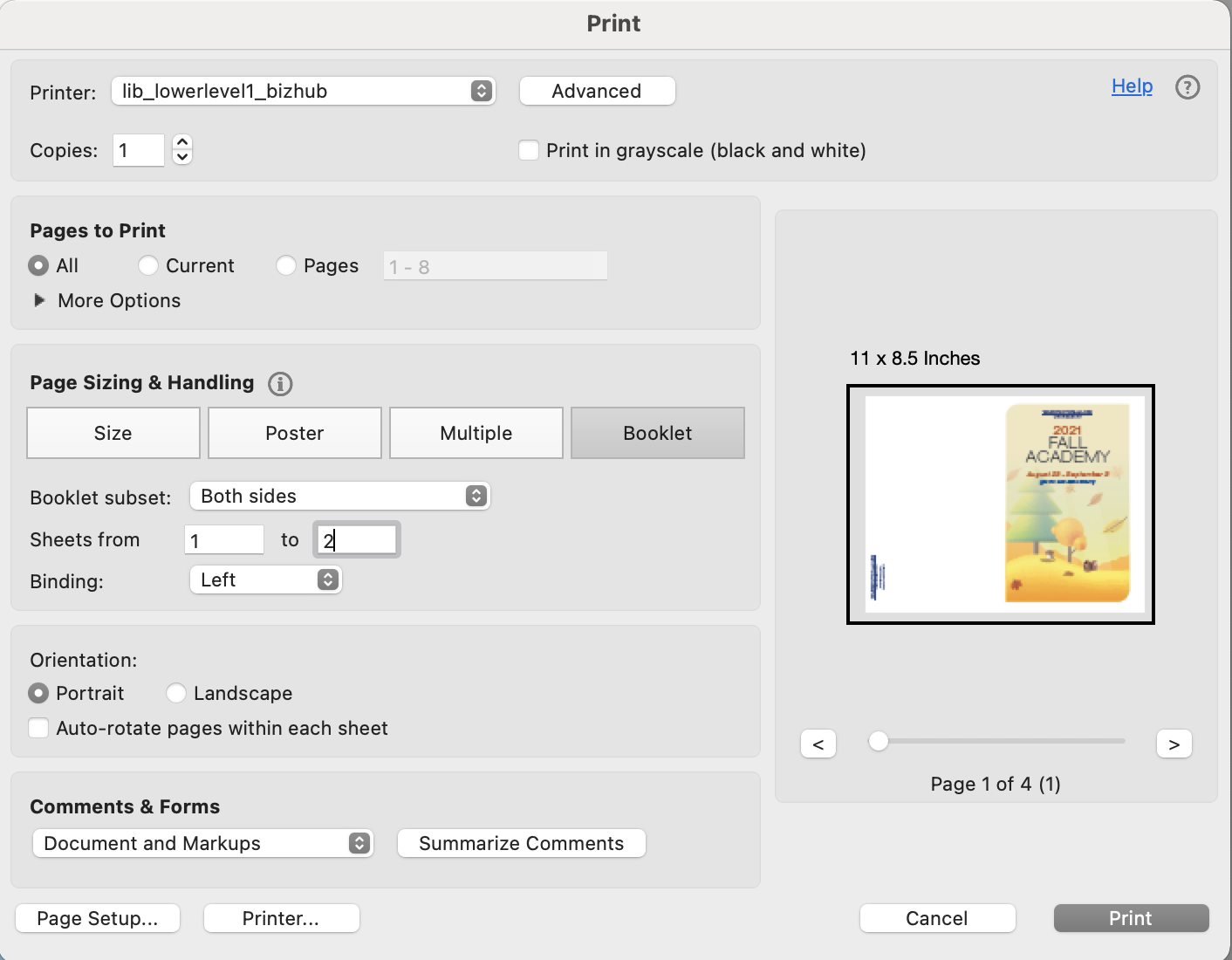
  3. Choose File > Print and select the desired printer.
  4. Under Pages to Print, select All.
  5. Under Page Sizing & Handling:
    • Select Booklet.
    • Select Both sides for Booklet subset.
    • Select Left for Binding.
    • Select Portrait for Orientation.
  6. Click the Print button. If you’re a Mac user, your screen will look something like this:
    Print Setting options for Adobe Acrobat DC on a Mac to print the Fall Academy schedule as a booklet
  7. Fold in half and enjoy!

There’s still time to sign up for Fall Academy sessions, but space is filling up fast, so don’t delay!

NEW! Updates from Classroom Technologies in W&L Learning Spaces

Help Cards – We’ve made Quick Start guides for how to use the classroom systems. They will be placed in classrooms prior to the fall term. Be on the look out for them!

W&L Guest Account – We’ve also added stickers to classroom monitors or keyboards with login information for a Guest account, so it is there when you need it. We recommend only using the guest account for someone who doesn’t have a WLU account. This account will not retain any information once you log off or someone else logs on to the computer.

Help Button – The  Help button is now responsive to whether Classroom Technologies personnel are on campus, if it is after hours, or if W&L is closed.

When you press the Help button and someone is here, you will see “A staff member is on their way to assist you.”

AV Help Schedule screenshot from podium

If it’s after hours or the University is closed, you will get a message similar to “For after-hours support, contact the Help Desk at 540-458-4357 (help@wlu.edu) to see if someone is available.”

In either situation, there will be a ticket created and assigned to the instructor who is scheduled in the room at that time. The ticket will come from the ITS Help Desk  and will allow us to easily communicate and resolve any issues quickly.

To learn more,  join the Classroom Technologies team at our Fall Academy session, Classroom Technology Demo/Tips,  on August 25th at 10:30 am in Leyburn 119. Register online at go.wlu.edu/fallacademy.
Technology and Tacos is BACK this Fall!

Technology & Tacos - A Lunchtime Workshop Series focusing on the IQ Center

Who doesn’t love tacos? And what could be better than tacos prepared by Dining Services for lunch with ITS Academic Technologies while learning about how you can partner with the IQ Center?

Please join us in Science Addition 202A (IQ Center) on: 

  • Tuesday, September 20 from 12:00 PM – 1:30 PM for  “Spatial Reconstruction – LiDAR and Photogrammetry” with George Bent, The Sidney Gause Childress Professor of Art History; Owen Collins, Professor of Theater; and Chris Connors, William E. Pritchard III ’80 Professor of Geology
  • Tuesday, October 25 from  12:00 PM – 1:30 PM for “Imaging – Panoramas, Drones and Video!” with David Harbor, Professor of Geology, and Isra El-Beshir, Associate Director of Museums
  • Thursday, November 10 from  12:00 PM – 1:30 PM for “Virtually Amazing” with Sandy de Lissovoy, Assistant Professor of Art, and Gregg Whitworth, Associate Professor of Biology

Registration is now open for all THREE Technology and Tacos/Thai/Turkey session at go.wlu.edu/tech. Sign up now! Space is limited.